Creating and executing effective social media strategies for your business or organization. Enhancing brand visibility, engagement, and online presence across social media.
- Formulate tailored social media strategies
- Measure the success of social media campaigns
- Develop comprehensive social media plans
- Create engaging and compelling content for social media platforms, including text, images, videos, and infographics
- Curate relevant and shareable content
- Ensure content relevant to your business’ or company’s brand voice, tone, and messaging guidelines
- Plan and execute paid social media advertising campaigns, enhancing reach, engagement, and conversions (sales)
- Target audiences to reach the most relevant users
- Monitor social media channels for mentions, comments, and messages
- Foster a positive and authentic relationship between your business and/or company and its social media followers

- Create a Profile:
- Set up a personal profile with basic information, profile picture, cover photo, and bio.
- Add Friends:
- Connect with friends and family by sending friend requests or accepting requests from others.
- Post Updates:
- Share text-based posts, photos, videos, links, and other content on your timeline.
- React and Comment:
- React to posts with “Like,” “Love,” “Haha,” “Wow,” “Sad,” or “Angry” emojis.
- Comment on posts to express opinions, provide feedback, or engage in discussions.
- Share Stories:
- Share temporary content in the form of stories, which disappear after a certain period.
- Join Groups:
- Join or create interest-based groups to connect with people who share similar interests.
- Follow Pages:
- Follow pages of organizations, businesses, celebrities, and public figures to stay updated with their content.
- Chat and Messaging:
- Send private messages to friends using Facebook Messenger.
- Participate in Events:
- RSVP to events, view event details, and communicate with event organizers and attendees.
- Create and Manage Pages:
- Create and manage pages for businesses, organizations, brands, or personal brands.
- Play Games:
- Play games on the platform and compete with friends or other users.
- Watch Videos:
- Watch videos posted by friends, pages you follow, or suggested videos.
- Shop on Marketplace:
- Buy and sell items through the Facebook Marketplace.
- Discover and Follow Watch:
- Explore and follow video content on Facebook Watch, which includes shows, series, and more.
- Fundraising and Donations:
- Raise funds for personal causes or charitable organizations through Facebook Fundraisers.
- Tagging:
- Tag friends, pages, or locations in your posts and photos.
- Privacy and Settings:
- Adjust privacy settings to control who can see your content and who can contact you.
- Explore News Feed:
- Scroll through the News Feed to view updates from friends, pages, and groups you follow.
- Search and Discover:
- Use the search feature to find friends, pages, groups, and content on specific topics.
- Add photo or video content
- Create a live video
- Add a life event
- Get in touch with old classmates
- Create a Professional Profile:
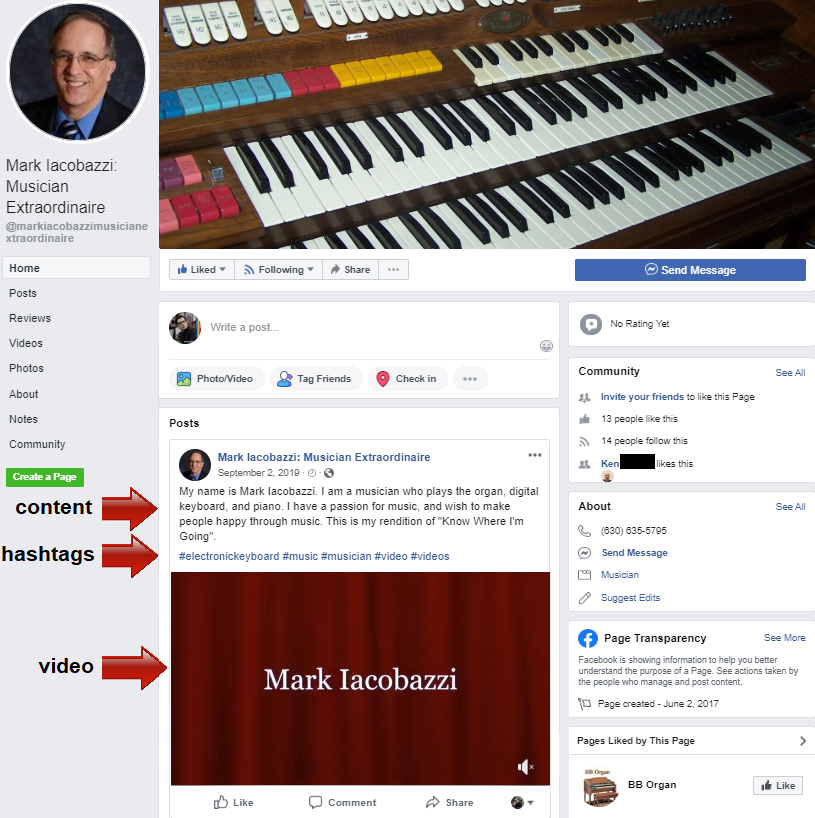
- Build a dedicated page for your business, including a profile picture, cover photo, and detailed about section to provide information about your business.
- Share Content:
- Share a variety of content including text updates, photos, videos, links, and live videos to engage with your audience.
- Engage with Followers:
- Interact with your audience by responding to comments, messages, and reviews promptly and professionally.
- Run Ad Campaigns:
- Use Facebook’s advertising platform to create and run targeted ad campaigns to reach a specific audience based on demographics, interests, behavior, and more.
- Access Insights and Analytics:
- Gain access to Facebook Insights, providing data and analytics on your page’s performance, including reach, engagement, and audience demographics.
- Create Events:
- Promote events related to your business and manage RSVPs from your followers.
- Shop and Services Section:
- Set up a Shop or Services section to showcase products or services you offer, allowing users to browse and make purchases directly on Facebook.
- Collect Reviews and Recommendations:
- Allow customers to leave reviews and recommendations, which can boost your credibility and reputation.
- Add a Call-to-Action (CTA) Button:
- Include a CTA button on your page (e.g., “Contact Us,” “Shop Now,” “Sign Up”), encouraging users to take a specific action.
- Pin Important Posts:
- Pin important posts or offers to the top of your page to ensure they’re the first thing visitors see.
- Create and Manage Events:
- Organize events related to your business, such as product launches, webinars, or workshops, and promote them to your followers.
- Collaborate with Other Pages:
- Collaborate and cross-promote with other pages to expand your reach and visibility.
- Manage Permissions and Roles:
- Assign roles to team members with varying levels of access and permissions to manage the page effectively.
- Optimize for SEO:
- Optimize your page’s content for search engines to improve discoverability and increase organic traffic.
- Schedule Posts:
- Use scheduling tools to plan and schedule your posts in advance for consistent content delivery.
- Integrate with Other Tools:
- Integrate third-party tools and apps to enhance the functionality and features of your Facebook Business Page.

- Create Boards:
- Create themed boards to organize and categorize your saved content. You can name and describe each board based on your interests or topics.
- Save Pins:
- Save (or “pin”) images, videos, and articles from the web to your boards. Pins are the visual bookmarks that represent the ideas you’re interested in.
- Discover Ideas:
- Explore a vast array of ideas and content on topics such as fashion, home decor, recipes, travel, DIY projects, and more. Pinterest’s algorithm tailors recommendations based on your interests and past interactions.
- Search for Inspiration:
- Use the search bar to find inspiration, discover trending ideas, and explore content related to specific topics.
- Repin and Like:
- Repin content from other users’ boards to save it to your own boards. You can also “like” pins to save them to your profile.
- Follow Users and Boards:
- Follow other users and boards to keep up with their latest pins and updates in your home feed.
- Collaborate on Boards:
- Invite others to collaborate on your boards, allowing them to add pins and contribute to the board’s content.
- Upload Pins:
- Upload your own images or videos directly to Pinterest to share your original content and ideas with the community.
- Shop:
- Discover and shop for products directly on Pinterest by clicking on shoppable pins that link to retailers’ websites.
- Use Idea Pins:
- Create Idea Pins, which are a series of images or videos that allow you to tell a story, share tutorials, or showcase your creativity.
- Create Ad Campaigns:
- Utilize Pinterest’s advertising platform to create and run paid ad campaigns to promote your business or products to a targeted audience.
- Insights and Analytics:
- Access Pinterest Analytics to track the performance of your pins, boards, and overall profile, helping you understand what resonates with your audience.
- Plan Content:
- Use tools like Pinterest Scheduler to plan and schedule your pins for optimal timing and consistency.
- Enable Rich Pins:
- Enable rich pins for your website to provide additional information, such as product details, recipe ingredients, or article descriptions, directly within the pin.
- Use Pinterest Trends:
- Explore Pinterest Trends to identify popular and emerging trends, helping you tailor your content and marketing strategy.




- Watch Videos:
- Browse and watch a vast array of videos on different topics, including entertainment, education, music, vlogs, tutorials, and more.
- Search for Content:
- Use the search function to find specific videos, channels, or topics of interest.
- Subscribe to Channels:
- Subscribe to your favorite channels to stay updated with their latest content.
- Like and Comment:
- Like videos to show appreciation and leave comments to engage with the creator and other viewers.
- Create and Upload Videos:
- Create your own videos on various subjects, edit them, and upload them to your YouTube channel.
- Livestream:
- Host live video streams on your channel, allowing real-time interaction with your audience.
- Create Playlists:
- Organize and create playlists to group related videos, making it easier for viewers to access content.
- Engage with the Community:
- Engage with your audience through community posts, polls, stories, and channel memberships.
- Enable Monetization:
- Apply for the YouTube Partner Program (YPP) to monetize your videos through ad revenue, memberships, Super Chats during live streams, and merchandise shelf integration.
- Customize Channel:
- Customize your channel’s layout, profile picture, cover image, and description to reflect your brand or content style.
- Access Analytics:
- Use YouTube Analytics to track your channel’s performance, view demographics, monitor engagement, and identify trends.
- Enable Premiere:
- Schedule video premieres to build excitement and allow viewers to chat in real-time before the video goes live.
- Interact with Fans:
- Respond to comments, engage in discussions, and build a community around your content.
- Join YouTube Shorts:
- Create short, engaging vertical videos using the YouTube Shorts feature.
- Use YouTube Studio:
- Manage and optimize your videos, playlists, and channel settings using YouTube Studio.
- Collaborate with Other Creators:
- Collaborate with other YouTubers to create joint videos or participate in community activities.
- Upload and Access 360-Degree Videos:
- Upload and view immersive 360-degree videos for an interactive viewing experience.

- Upload and Share Videos:
- Upload your videos to the platform and share them with your audience.
- Customize Video Player:
- Customize the appearance of the video player, including colors, logos, and player controls, to match your branding.
- Create Channels:
- Organize your videos into channels to group content by themes, categories, or projects.
- Monetize Videos:
- Offer your videos for rent, purchase, or subscription to generate revenue from your content.
- Enable Tip Jar:
- Allow viewers to tip you for your content as a form of support.
- Password-Protect Videos:
- Secure your videos with a password, limiting access to authorized viewers only.
- Collaborate with Team Members:
- Collaborate with team members by sharing videos privately and managing permissions and access levels.
- Access Analytics:
- Use Vimeo’s analytics to track video performance, engagement metrics, viewer demographics, and other insights.
- Embed Videos:
- Embed videos on your website, blog, or other online platforms to share your content seamlessly.
- Create Showcases:
- Create custom showcases to display your videos in an appealing and organized manner.
- Use Privacy Settings:
- Customize privacy settings for each video, such as public, private, or restricted access to specific domains or websites.
- Livestream Events:
- Host and stream live events, webinars, or performances using Vimeo’s livestreaming features.
- Review and Approve:
- Allow clients or collaborators to review and approve videos before they’re finalized.
- Collaborate and Comment:
- Collaborate with team members or clients by leaving time-stamped comments on videos for feedback and improvements.
- Integrate with Other Tools:
- Integrate with various third-party tools and platforms to enhance functionality and connect with other services.
- Use Vimeo On Demand:
- Sell or rent your videos directly to viewers through the Vimeo On Demand service.
- Explore Community and Discover Content:
- Discover and explore videos within the Vimeo community, follow creators, and engage with their content.

- Create a Professional Profile:
- Build a detailed personal or business profile showcasing your professional experience, skills, education, and accomplishments.
- Connect with Professionals:
- Connect with colleagues, industry peers, potential employers, clients, and other professionals to expand your network.
- Join and Participate in Groups:
- Join LinkedIn Groups related to your industry or interests to engage in discussions, share knowledge, and connect with like-minded professionals.
- Share Content:
- Share articles, posts, images, videos, and documents to demonstrate your expertise, share industry insights, and engage your network.
- Recommend and Get Recommendations:
- Provide recommendations for your connections based on their skills and experiences, and request recommendations from others.
- Endorse Skills:
- Endorse your connections’ skills to validate their expertise and improve their profile’s credibility.
- Search and Apply for Jobs:
- Search for job opportunities, apply for positions, and receive job recommendations based on your profile and preferences.
- Follow Companies:
- Follow companies to stay updated on their news, job openings, and industry updates.
- Publish Articles:
- Write and publish long-form articles on LinkedIn to share in-depth insights, thought leadership, or professional experiences.
- Participate in Webinars and Events:
- Attend and participate in webinars, virtual events, and online training sessions hosted on LinkedIn.
- Send Messages and InMail:
- Send messages to your connections or use InMail to contact people outside your network for professional inquiries, collaborations, or job opportunities.
- Create and Share Videos:
- Record and share videos to provide updates, share knowledge, or engage your audience in a more interactive way.
- Access Learning and Courses:
- Access LinkedIn Learning to take online courses and develop new skills in various fields.
- Highlight Volunteer Work and Causes:
- Showcase your volunteer experiences, philanthropic activities, and causes you care about.
- Personal Branding and Reputation Building:
- Use LinkedIn to build your personal brand, establish thought leadership, and showcase your expertise in your industry.
- Advertise and Promote Content:
- Use LinkedIn Ads to reach a targeted audience and promote your content, products, or services.
- Access Analytics:
- Utilize LinkedIn Analytics to track the performance of your posts, profile views, engagement, and more.

- Tweet:
- Post short messages, called tweets, with a maximum of 280 characters, to share your thoughts, updates, links, images, and videos.
- Follow Accounts:
- Follow other users, including individuals, businesses, organizations, celebrities, and more, to see their tweets in your timeline.
- Retweet and Quote Tweet:
- Retweet other users’ tweets to share them with your followers. Quote tweets to add your comments along with the original tweet.
- Like Tweets:
- Like tweets to show appreciation or agreement with the content.
- Reply and Mention:
- Reply to tweets to engage in conversations and mention other users by using “@” followed by their username.
- Hashtags:
- Use hashtags (#) to categorize and organize tweets, making them more discoverable based on topics.
- Retweet with Comment:
- Retweet a tweet with an added comment to share your thoughts or context.
- Follow Trends:
- Explore trending topics and hashtags to stay updated with what’s happening and join discussions on current events.
- Direct Messages (DMs):
- Send private messages to other users via direct messaging.
- Create and Manage Lists:
- Create lists to organize and categorize the people you follow, making it easier to filter and view tweets from specific groups.
- Explore Moments:
- Explore curated collections of tweets around trending topics, events, news, or stories in the “Moments” section.
- Share Media:
- Share images, GIFs, and videos by attaching them to your tweets.
- Pin Tweets:
- Pin important tweets to the top of your profile to ensure they’re the first thing visitors see when they view your profile.
- Access Twitter Spaces:
- Join and participate in live audio conversations using Twitter Spaces.
- Follow Threads:
- Read and follow tweet threads, which are a series of connected tweets on a particular topic.
- Explore Discover:
- Explore the “Discover” section to find recommended accounts to follow, trending topics, and popular tweets.
- Twitter Polls:
- Create and participate in polls to gather opinions and engage your audience.
- Promote Tweets and Advertise:
- Promote tweets to reach a broader audience using Twitter’s advertising platform.
- Access Analytics:
- Use Twitter Analytics to track tweet performance, audience growth, engagement metrics, and more.

- Create a Profile:
- Set up a profile with a profile picture, bio, and links to personal websites or other social media profiles.
- Post Photos and Videos:
- Share photos and videos from your device’s gallery, accompanied by captions and hashtags.
- Stories:
- Share temporary photos or videos that disappear after 24 hours, allowing for a more casual and ephemeral form of sharing.
- IGTV (Instagram TV):
- Share longer videos, episodes, or vlogs through IGTV, a dedicated platform within Instagram.
- Reels:
- Create and share short, engaging videos with music, effects, and other creative elements.
- Explore and Discover:
- Explore content from other users, trending hashtags, and popular posts using the “Explore” tab.
- Follow and Be Followed:
- Follow other users and gain followers in return to see their posts in your feed and vice versa.
- Like, Comment, and Share:
- Like photos or videos by tapping the heart icon, comment to engage with the creator, and share posts with your followers.
- Direct Messaging (DMs):
- Send private messages, photos, videos, or voice messages to other users through Instagram Direct.
- IG Live:
- Go live and stream real-time video content to interact with your followers.
- Hashtags:
- Use hashtags to categorize and discover content related to specific topics, events, or interests.
- Tagging:
- Tag other users or locations in your posts to increase visibility and engagement.
- Follow Hashtags:
- Follow hashtags to see related content directly in your feed and stay updated on specific topics.
- Create and Participate in Challenges:
- Participate in trending challenges or create your own to engage with the Instagram community.
- Shop:
- Explore and shop for products directly from posts or stories through shoppable tags and links.
- Insights and Analytics:
- Access Instagram Insights to analyze your account’s performance, including reach, engagement, and audience demographics.
- Save Posts:
- Save posts privately to collections for easy access and reference.
- Switch to Business or Creator Account:
- Switch to a business or creator account to access additional features, insights, and promotional options.
- Create a free LinkTree account for your content
 Tiffany Rose Creative Media LLC